Installing OpenStep 4.2 on Parallels
NeXTSTEP was one of the advanced operating systems of the '90s. You can understand why by watching this video:
Every feature Steve Jobs introduced in this video was possible in 1992, which is amazing. I had dreamed of using NeXTSTEP ever since I became aware of it, but I had never seen a running demo and had only seen a NeXTcube. By chance, I found instructions on how to install OpenStep 4.2 on Parallels, and NeXTSTEP (OpenStep 4.2) finally started running on my machine. o/

If you want to run OpenStep 4.2, follow this instruction. The only problem is that the network doesn't work, so you need to install a network driver. I found the solution by googling, but the link to the NE2000 disk image (http://www-teaching.physics.ox.ac.uk/NextStep/NE2K_driver.fdd) was broken. Fortunately, I was able to recover the link from the Internet Archive, so you can download it here.
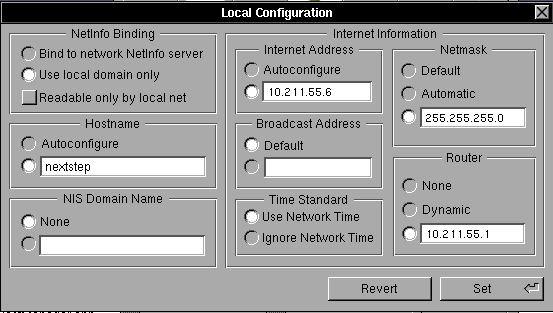
Network setting:
- Install the NE2K driver.
- Shut down. Under Boot Order, make sure the hard drive is the first device, and add
devices.net.force_adapter_type=rtlto the boot flags. - Set the shared network, then reboot.
- Open HostManager.app. Under Local, choose "use local domain only".
- Assign one of the available IPs in your local network, then reboot the machine.
- Add a name server in
/etc/resolv.conf.

Installing the developer tools: there is a good video on YouTube.
The next step is to write some Objective-C code using this book and to download some applications from http://www.nextcomputers.org/NeXTfiles/.